AI Scheduling

Scheduling that builds itself.

Providers set preferences. Admins set rules. The solver handles the rest — multi-location, multi-role schedules resolved simultaneously with no manual rework.

Make it easy to hear your staff.

Providers walk through a guided preference wizard before each scheduling cycle — setting the days they prefer to work, shifts they'd like to avoid, and any hard constraints. Soonest collects everything in one place so nothing falls through the cracks.

When staff see their preferences honored, they feel heard. That's a direct driver of engagement and retention in high-burnout environments.
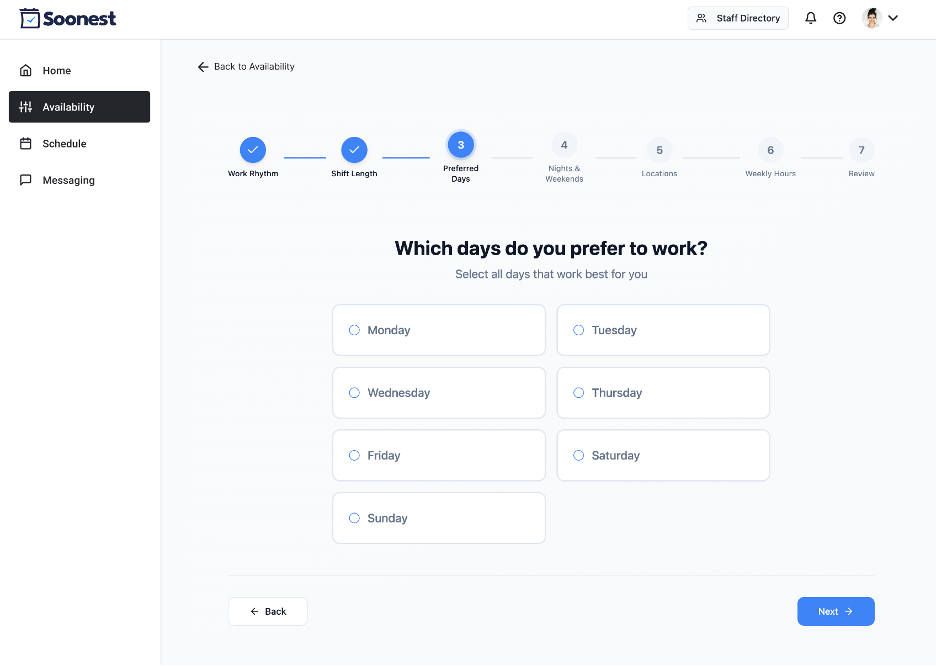
Soonest preference wizard — guided multi-step preference collection
Guided Collection
Multi-step wizard walks providers through preferences for each scheduling cycle
Hard vs. Soft
The solver knows the difference between "I'd prefer not to" and "I absolutely can't"
Transparent Results
Staff see exactly which preferences were honored in each published schedule — and why
No Chasing
No email threads, no spreadsheets. Preferences come in automatically before the cycle starts

Trades, releases, and call-outs — handled without you.

Three distinct workflows for when life happens. Staff self-serve through the platform. You set whether admin approval is required. Coverage gaps fill without you chasing anyone.

Trade

1-for-1 swap between two providers — offered directly or posted org-wide for anyone to pick up. Rules and admin approval settings are yours to configure.

Release

"I'd prefer not to work this shift, but I will if no one else picks it up." Soft release into the open marketplace with a built-in fallback so coverage is never at risk.

Call-Out

Last-minute illness notification that immediately alerts admin and opens the shift to the organization. Locum tenens partner integration available if no one picks it up.

Schedule Grade

Every published schedule receives an automatic grade rating fairness, constraint coverage, and preference satisfaction. You see exactly how well the schedule performed against your rules — and staff can see which of their preferences were honored and why.

This is your new scheduling workflow.

Scheduling disappears from your plate. We handle the busy work. You stay in full control.

1

Preferences flow in automatically

Providers submit availability, preferences, and constraints in one place — on their own time.

2

Schedules build themselves

AI generates a fair, rules-compliant schedule across all locations simultaneously. No manual rework.

3

Swaps resolve without you

Staff trade, release, and cover shifts through the platform. No back-and-forth, no group texts.

4

All you do is approve

One click. That's your new scheduling workflow.

Keep your whole team in sync — without the group texts.

Soonest includes a built-in messaging hub so communication lives where the schedule does. Create org-wide channels, department groups, or direct messages — all in one place.

  • Create custom groups by department, site, or role
  • Org-wide announcements broadcast to all providers instantly
  • Direct messaging between providers and admin
  • Messages tied to schedules, shifts, and changes — context stays together
Messaging Hub
3 unread
Channels
# general
# ed-team
# urgent-care
# announcements 2
Direct
Dr. Yeates
Admin
A
Admin 9:04 AM
Reminder: April schedule preferences due by Friday EOD. Submit via the app.
T
Dr. Torres 9:17 AM
Just submitted. Can someone cover my April 14th overnight? Happy to trade.
K
Dr. Kim 9:31 AM
I can take it — sending a trade request now.
Message #general...

Every client gets a dedicated schedule assistant.

Software alone doesn't solve the problem. That's why every Soonest client is assigned a real human assistant who builds your setup, handles the details, and keeps everything running.

"We do the busy work. You stay in full control."

Your Schedule Assistant
A real person. Not a ticket queue.
Builds out your entire org, users, shifts, and locations during onboarding
Imports existing preference data and historical schedules
Trains your admins and staff — open office hours included
Handles last-minute changes, coverage gaps, and edge cases ongoing
Total admin time to get live: about 4 hours on your end

See AI Scheduling in action.

Request a demo and we'll walk you through how the scheduling solver works with your group's actual shifts, rules, and provider preferences.